Introduction
Last week I showed you how to work with workspaces — creating, updating, removing, assigning capacities. But we were doing each operation in isolation. Today I want to show you what happens when you connect those operations together using the PowerShell pipeline.
This is one of my favourite aspects of PowerShell and therefore it was imperative that Jess Pomfret B S L and I revamped the module to fully support pipeline operations. Every cmdlet that makes sense in a pipeline is built to work in one.
How It Works
The PowerShell pipeline is a mechanism for passing output from one cmdlet to another, allowing for the chaining of commands. Unlike traditional command execution where output is displayed or stored as text, the pipeline in PowerShell passes objects directly. This object-based approach makes it possible to work with complex data types and leverage the rich set of properties and methods that objects offer.
Basic Pipeline Examples
Get all Lakehouses across all workspaces:
| |

Get all Notebooks across all workspaces:
| |

How about something neater and super useful.
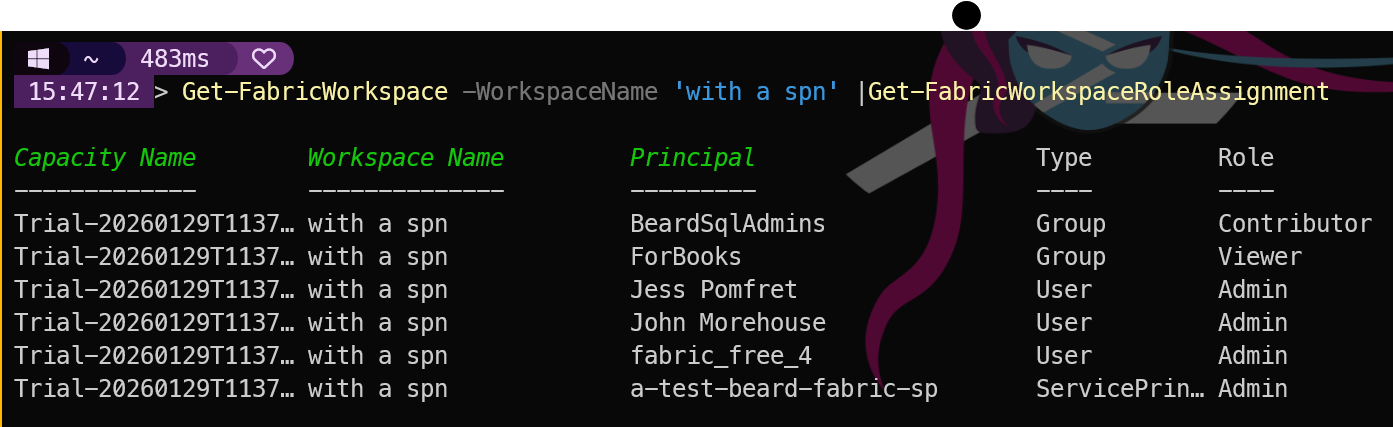
When the Teams message says “Hey, can you tell me who has access to that workspace?” you can now reply with a single command instead of going to the portal and clicking through multiple screens:
| |

These are genuine one-liners that do real work. I love it. I have used this sort of flow for many years in SQL Server admin and Azure infrastructure management and it is fantastic to be able to build something the same for Microsoft Fabric.
The additional beauty of Piping
Of course, piping commands is not just limited to the same module. You can pipe those results to any other functions that can accept that input which means you can easily export to CSV, JSON, HTML, Excel, Word, or even send an email with the results. The possibilities are endless as I have been saying for years — PowerShell is not just a scripting language, it is an automation platform. The pipeline is the heart of that platform.
| |
Counting and Grouping
You can also pipe to cmdlets that perform calculations or grouping.
| |
| |


Why This Matters
Pipeline support transforms a collection of individual cmdlets into a composable automation toolkit. You are not just managing one workspace or one Lakehouse — you are managing your entire Fabric estate with readable, maintainable PowerShell.
Tomorrow we look at help and discovery — with over 295 cmdlets in the module, knowing how to find what you need quickly is a skill in itself. See you then.
You can find all of the blog posts about MicrosoftFabricMgmt here - MicrosoftFabricMgmt Blog Posts